is here! Shop now, pay later in 4 easy installments


Upload Your Own DTF Gang Sheet
Upload Your Own DTF Gang Sheet
Upload a ready-made gang sheet and get it printed
Already have your sheet designed? Upload your finished artwork and we’ll print it as submitted using vibrant 9-colour, ready-to-press DTF transfers. Choose your sheet size, upload your file, and order online in NZ.
- Best for: designers, repeat orders, businesses, clubs, and anyone with a completed gang-sheet layout.
- Starting at: NZD $15 for an A3 sheet, with larger sizes available.
- What you receive: full-colour transfers ready to press with a heat press.
Not sure which DTF option to choose?
- Create Your DTF Gang Sheet if you want to arrange multiple designs in our builder.
- Image by Size if you only need one logo or design.
How it works
- Choose the sheet size that matches your artwork.
- Upload your ready-to-print gang-sheet file.
- Place your order, and press your transfers when they arrive.
Artwork guidelines
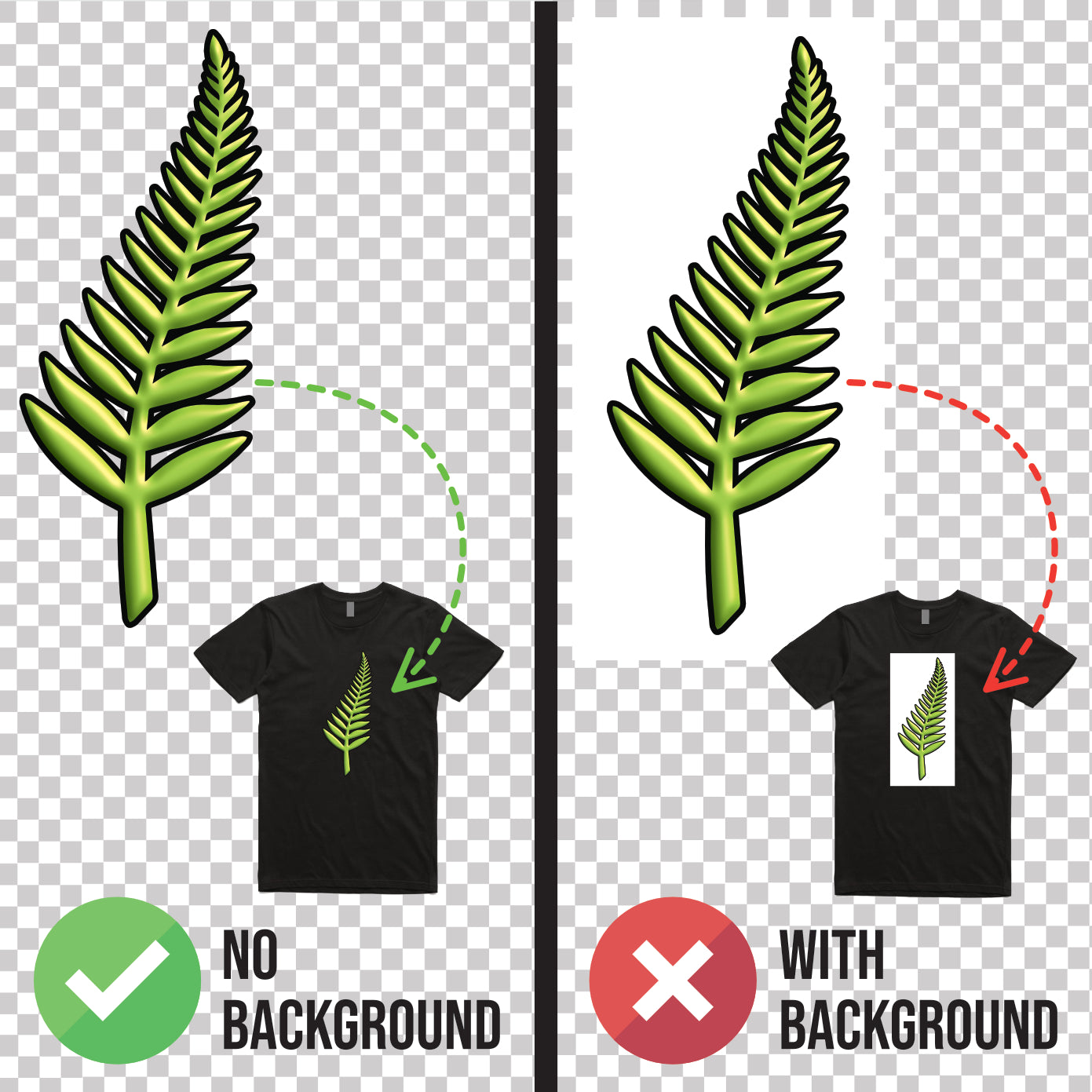
Upload a PNG file with a transparent background whenever possible. This helps avoid unwanted boxes or backgrounds around your design. We can remove a background for a small fee if needed.
Review the full artwork guidelines before uploading to avoid blurry prints, unexpected colours, or unwanted backgrounds.
Need custom sizes or multiple designs?
If your size is not listed, or you’re uploading five or more separate artworks, Create Your DTF Gang Sheet to arrange everything efficiently and get more value from your print space.
Need halftone conversion?
We can prepare your artwork with a clean halftone setup for smooth fades, fine detail, and soft, comfortable prints. Learn more about halftone conversion.

Please note: This option is for ready-to-print gang sheets. Your file will be printed exactly as submitted, so please make sure your artwork is correctly sized before uploading.
Our system will automatically check the size of your uploaded gang sheet and match it to the correct size and price. For easy and accurate sizing, you can also use our Gang Sheet Builder. If you need help resizing your artwork, just get in touch with us — we’re happy to help!
ARTWORK REQUIREMENTS
ARTWORK REQUIREMENTS
To ensure the best print quality, please follow these guidelines when submitting your artwork:
File Format: Upload your artwork in high-quality PNG or PDF formats with a transparent background. If you have any questions or concerns, feel free to reach out!
Resolution: For optimal print quality, we recommend a minimum of 300 DPI.
Colour Mode: Please note that fluorescent or neon colours can’t be accurately reproduced on our 9-colour printer without specialised fluorescent inks. While we produce bright and vibrant prints, true fluorescent colours won’t print exactly as they appear on screen.
Ownership and Rights: You must be the rightful owner or have the rights to all images, including copyrighted images, used in your file.
File Size: Ensure that your files are uploaded to the specified size. Any artwork outside of these parameters may not print correctly.
Not sure if your artwork meets the guidelines? No worries! Just send us your artwork and we’ll check everything for you.
GUIDELINES
Testing: We recommend testing the transfer on a sample garment before full production.
Application: Follow the provided instructions carefully for the best results.
Garment Types: DTF transfers work on various fabrics, but always test compatibility with your material.
These details help ensure you get the best outcome with your transfers!
GARMENTS
DTF (Direct to Film) transfers are suitable for a wide range of garments, including:
Cotton - Perfect for 100% cotton fabrics, offering vibrant and long-lasting prints.
Polyester - Works well on polyester and polyester blends.
Blends - Great for cotton-poly blends or other mixed fabrics.
Dark and Light Colors - Suitable for both light and dark-colored garments without losing print quality.
Stretchy Materials - Can be used on slightly stretchy garments like athletic wear or leggings, as the design remains flexible.
DTF transfers are versatile and work on most fabrics, making them a reliable choice for customized apparel.
PRINT APPLICATIONS
Achieving a high-quality, durable print with DTF transfers requires the correct temperature settings and application process. Follow these steps for the best results:
1. Preheat the Press
Set your heat press to 150°C–160°C with medium pressure to ensure proper adhesion.
2. Prepare the Fabric
Place the garment on the heat press and pre-press for 5 seconds to remove moisture and wrinkles.
3. Position the Print
Place the DTF transfer print-side down on the fabric in the desired position. Cover with parchment/teflon paper.
4. Press the Design
Close the heat press and apply heat for 10-12 seconds to transfer the design.
5. Peel the Transfer
Peel while the transfer is still warm, in a smooth and steady motion.
6. Final Press
Cover the design with a parchment or Teflon sheet and press again for 5 seconds to ensure strong adhesion and a smooth finish.
Using a Home Iron (For Personal Use)
While a home iron can be used in a pinch, it may not provide even heat and pressure like a heat press. If using an iron:
- Set it to high (without steam).
- Press firmly for 20-30 seconds without sliding.
- Ensure even pressure for the best results.
For consistent and professional-quality prints, a heat press is strongly recommended.
Recommended Temperature Settings by Fabric Type
Different garments require the correct temperature settings for the best results. Always check and adjust accordingly:
- Cotton: 150-160°C
- Polyester: 130-150°C (Lower temp helps prevent scorching or dye migration.)
- Cotton-Polyester Blends: 140-160°C
- Nylon: 120-140°C (Lower temp and shorter press time to avoid melting.)
- Spandex/Lycra: 120-140°C (Use light pressure to prevent distortion.)
Following these steps and temperature settings will help you achieve professional-quality DTF prints on various fabrics.
STORAGE INSTRUCTIONS
To keep your DTF (Direct to Film) transfers in top condition until you're ready to use them, follow these tips:
Store in a Cool, Dry Place: Avoid heat and humidity. Ideal temperature is 15–25°C (59–77°F).
Keep Away from Sunlight: Direct sunlight can damage the print and adhesive.
Flat or Upright Storage: Store transfers flat in a drawer or upright in a folder—do not fold or roll unless designed to be.
Avoid Dust and Moisture: Use ziplock bags or airtight containers to keep them clean and dry.
No Heavy Pressure: Don’t place heavy items on top of transfers, as this can affect the ink and adhesive.
Shelf Life: Best used within 6 months for optimal results.
TURNAROUND & SHIPPING
Turnaround Time
Orders placed before 12pm are processed within 24 hours and dispatched the next working day.
Orders placed after 12pm are processed the following working day and dispatched the day after.
Examples:
- Monday before 12pm: Printed Monday, dispatched Tuesday
- Monday after 12pm: Printed Tuesday, dispatched Wednesday
- Thursday night: Printed Friday, dispatched Monday (no courier pickups or deliveries on weekends)
- Weekend orders: Printed Monday and dispatched Tuesday
- In some cases, orders may be printed over the weekend and dispatched on Monday
Estimated Delivery Times
- Auckland: 1–2 business days
- North Island: 1–3 business days
- South Island: 1–4 business days
- Rural deliveries: Please allow an additional 2–3 business days
Shipping Rates
- Auckland: $7.50 – $9.50
- North Island: $7.50 – $15.00
- South Island: $7.50 – $19.50
- Rural deliveries: Calculated at checkout
🆓 FREE SHIPPING for orders $299 and above.
Courier & Delivery Schedule
- Carrier: CourierPost
- Delivery days: Monday to Friday (business days only)
- Delivery times: Between 8am and 5pm
Weekends & Public Holidays
Please note that couriers do not operate on weekends (Saturday & Sunday) or public holidays.
Delivery Timeframes & Delays
We’ll get your order printed and dispatched as quickly as possible. Once it’s with CourierPost, delivery times are handled by the courier and may vary due to courier delays, weather conditions, public holidays, or other unforeseen circumstances.
If a delay occurs, CourierPost will attempt redelivery on the next working day.
For any questions, feel free to contact us at sales@blanksandprint.co.nz.
PICK UP INFO
Order Pick-Up Information
We offer a convenient pick-up option from our Pukekohe, Auckland location. Please have a quick read through the details below before selecting pick-up at checkout.
If you choose Pick-Up at checkout, your order will be placed in our pick-up box at the front door of our premises.
A few things to note:
- Pick-up is from a private property, so please collect your order from the pick-up box only. We’re not onsite for walk-ins, so please schedule a time if you need help.
- Once you receive your pick-up message, we recommend collecting your order within 2 hours, as DTF transfers can be affected by heat and humidity. If you’re unable to collect within 2 hours, please let us know when you’ll be able to pick up.
- Blanks and Print can’t take responsibility for any damage caused by weather, heat, humidity, or theft once your order has been placed in the pick-up box.
For everyone’s safety and privacy:
- Please collect your own order only from the pick-up box.
- The property has security cameras on-site at all times.
For any questions, feel free to contact us at sales@blanksandprint.co.nz.
REPLACEMENTS & REFUNDS
Since our DTF transfers are printed to order, they can’t be returned. As each order is custom produced, please see our refund and replacement policy below.
Errors on our End
If we print the wrong design, size, quantity, or there’s a verified print issue, please contact us within 5 days of delivery with:
- Your order number
- Clear photos of the issue
We will:
- Reprint your order free of charge
- Cover replacement shipping
If a reprint isn’t possible, a refund may be issued. We handle each case individually to make it fair.
Buyer Error
If incorrect artwork, spelling, sizing, low-resolution files, or other details were submitted:
- Refunds aren't possible
Please double-check all artwork, sizing, and details before placing your order.
Refunds
Refunds may be issued if:
- The order is cancelled before production begins
- We are unable to resolve a verified issue
Refunds are processed within 7–10 working days to the original payment method.
Cancellations (All Orders)
- Orders cancelled before processing will receive a refund minus transaction fees.
- Once an order has been processed or shipped, cancellations are no longer possible.
For any questions, feel free to contact us at sales@blanksandprint.co.nz.
Share
Other industry favorites
Origin 2 Hoodie - Womens HSW
Edge Hoodie V2 EDG
Image by Size
65000 Gildan Softstyle Men Midweight Tee
R905B Result Recycled PET Youth Qtr.Zip Fleece Top
Follow Us
PAGES
POLICIES
Don't miss out
EmailPayment methods
© 2026,Blanks and PrintAll rights reserved.
GUIDELINES
GUIDELINES
Testing: We recommend testing the transfer on a sample garment before full production.
Application: Follow the provided instructions carefully for the best results.
Garment Types: DTF transfers work on various fabrics, but always test compatibility with your material.
These details help ensure you get the best outcome with your transfers!
GARMENTS
GARMENTS
DTF (Direct to Film) transfers are suitable for a wide range of garments, including:
Cotton - Perfect for 100% cotton fabrics, offering vibrant and long-lasting prints.
Polyester - Works well on polyester and polyester blends.
Blends - Great for cotton-poly blends or other mixed fabrics.
Dark and Light Colors - Suitable for both light and dark-colored garments without losing print quality.
Stretchy Materials - Can be used on slightly stretchy garments like athletic wear or leggings, as the design remains flexible.
DTF transfers are versatile and work on most fabrics, making them a reliable choice for customized apparel.
PRINT APPLICATIONS
PRINT APPLICATIONS
Achieving a high-quality, durable print with DTF transfers requires the correct temperature settings and application process. Follow these steps for the best results:
1. Preheat the Press
Set your heat press to 150°C–160°C with medium pressure to ensure proper adhesion.
2. Prepare the Fabric
Place the garment on the heat press and pre-press for 5 seconds to remove moisture and wrinkles.
3. Position the Print
Place the DTF transfer print-side down on the fabric in the desired position. Cover with parchment/teflon paper.
4. Press the Design
Close the heat press and apply heat for 10-12 seconds to transfer the design.
5. Peel the Transfer
Peel while the transfer is still warm, in a smooth and steady motion.
6. Final Press
Cover the design with a parchment or Teflon sheet and press again for 5 seconds to ensure strong adhesion and a smooth finish.
Using a Home Iron (For Personal Use)
While a home iron can be used in a pinch, it may not provide even heat and pressure like a heat press. If using an iron:
- Set it to high (without steam).
- Press firmly for 20-30 seconds without sliding.
- Ensure even pressure for the best results.
For consistent and professional-quality prints, a heat press is strongly recommended.
Recommended Temperature Settings by Fabric Type
Different garments require the correct temperature settings for the best results. Always check and adjust accordingly:
- Cotton: 150-160°C
- Polyester: 130-150°C (Lower temp helps prevent scorching or dye migration.)
- Cotton-Polyester Blends: 140-160°C
- Nylon: 120-140°C (Lower temp and shorter press time to avoid melting.)
- Spandex/Lycra: 120-140°C (Use light pressure to prevent distortion.)
Following these steps and temperature settings will help you achieve professional-quality DTF prints on various fabrics.
STORAGE INSTRUCTIONS
STORAGE INSTRUCTIONS
To keep your DTF (Direct to Film) transfers in top condition until you're ready to use them, follow these tips:
Store in a Cool, Dry Place: Avoid heat and humidity. Ideal temperature is 15–25°C (59–77°F).
Keep Away from Sunlight: Direct sunlight can damage the print and adhesive.
Flat or Upright Storage: Store transfers flat in a drawer or upright in a folder—do not fold or roll unless designed to be.
Avoid Dust and Moisture: Use ziplock bags or airtight containers to keep them clean and dry.
No Heavy Pressure: Don’t place heavy items on top of transfers, as this can affect the ink and adhesive.
Shelf Life: Best used within 6 months for optimal results.
TURNAROUND TIME & SHIPPING
TURNAROUND TIME & SHIPPING
Turnaround Time
Orders placed before 12pm are processed and dispatched the same day.
Orders placed after 12pm will be processed and dispatched the next working day.
Please note: We aim to get your order dispatched as quickly as possible, but next-day delivery cannot be guaranteed as delivery times depend on the courier’s schedule and service.
Estimated Delivery Times
- Auckland: 1–2 business days
- North Island: 1–3 business days
- South Island: 2–4 business days
- Rural deliveries: Please allow an additional 2–3 business days
Shipping Rates
- Auckland: $8.00
- North Island: $8.00 – $12.00
- South Island: $8.00 – $15.00
- Rural deliveries: Calculated at checkout
🆓 FREE SHIPPING for orders $299 and above.
Courier & Delivery Schedule
- Carrier: CourierPost
- Delivery days: Monday to Friday (business days only)
- Delivery times: Between 8am and 5pm
Weekends & Public Holidays
Please note that couriers do not operate on weekends (Saturday & Sunday) or public holidays.
Delivery Timeframes & Delays
We’ll get your order printed and dispatched as quickly as possible. Once it’s with CourierPost, delivery times are handled by the courier and may vary due to courier delays, weather conditions, public holidays, or other unforeseen circumstances.
If a delay occurs, CourierPost will attempt redelivery on the next working day.
For any questions, feel free to contact us at sales@blanksandprint.co.nz.
PICK UP INFO
PICK UP INFO
Order Pick-Up Information
We offer a convenient pick-up option from our Papakura, Auckland location. Please have a quick read through the details below before selecting pick-up at checkout.
If you choose Pick-Up at checkout, your order will be placed in our pick-up box at the front door of our premises.
A few things to note:
- Pick-up is from a private property, so please collect your order from the pick-up box only. We’re not onsite for walk-ins, so please schedule a time if you need help.
- Once you receive your pick-up message, we recommend collecting your order within 2 hours, as DTF transfers can be affected by heat and humidity. If you’re unable to collect within 2 hours, please let us know when you’ll be able to pick up.
- Blanks and Print can’t take responsibility for any damage caused by weather, heat, humidity, or theft once your order has been placed in the pick-up box.
For everyone’s safety and privacy:
- Please collect your own order only from the pick-up box.
- The property has security cameras on-site at all times.
For any questions, feel free to contact us at sales@blanksandprint.co.nz.
REPLACEMENTS & REFUNDS
REPLACEMENTS & REFUNDS
Since our DTF transfers are printed to order, they can’t be returned. As each order is custom produced, please see our refund and replacement policy below.
Errors on our End
If we print the wrong design, size, quantity, or there’s a verified print issue, please contact us within 5 days of delivery with:
- Your order number
- Clear photos of the issue
We will:
- Reprint your order free of charge
- Cover replacement shipping
If a reprint isn’t possible, a refund may be issued. We handle each case individually to make it fair.
Buyer Error
If incorrect artwork, spelling, sizing, low-resolution files, or other details were submitted:
- Refunds aren't possible
Please double-check all artwork, sizing, and details before placing your order.
Refunds
Refunds may be issued if:
- The order is cancelled before production begins
- We are unable to resolve a verified issue
Refunds are processed within 7–10 working days to the original payment method.
Cancellations (All Orders)
- Orders cancelled before processing will receive a refund minus transaction fees.
- Once an order has been processed or shipped, cancellations are no longer possible.
For any questions, feel free to contact us at sales@blanksandprint.co.nz.